01
BRANDMEISTER
Choose a US master and a public talkgroup or private destination. Talk through the phone’s internet connection, use the knob for master volume, and follow calls in Last Heard with cached RadioID names and country flags.
 CJ1 RADIO COMMANDGET THE BUILD
 KE5EUA / PURPOSE-BUILT FOR THE CJ1
From your local repeater to a reflector across the planet. Voice, data, and field tools—under your command.
01 / BUILT TO OPERATE
CJ1 Radio Command brings the CJ1’s hardware radio and a growing collection of amateur-radio tools into one consistent, dark interface. Turn the knob. Choose your channel. Take the station with you.
TAP THE SCREEN TO TAKE A CLOSER LOOK ↗
THE REPEATER. THE SIMPLEX CALL. THE EVERYDAY RADIO.
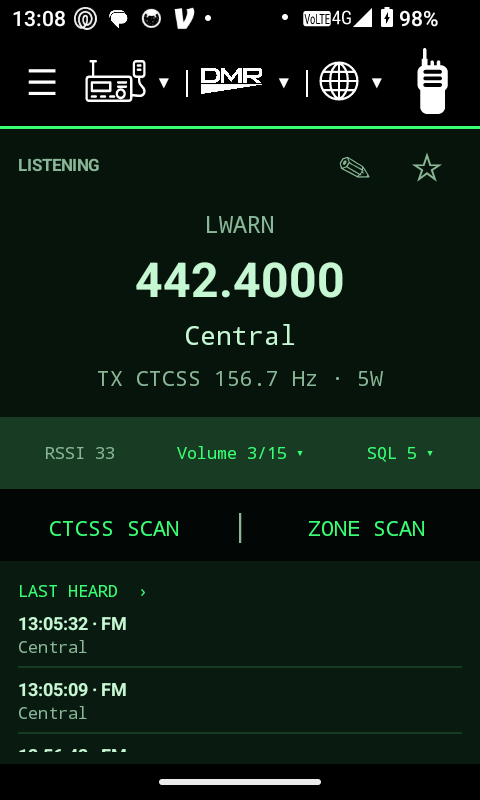
Operate the CJ1’s onboard analog radio with the information you need up front: frequency, channel name, transmit tone, power, signal strength, volume, and squelch.
The hardware knob selects channels in the current zone. Tap SQL to choose a squelch level, or Volume for a direct 0–15 selection.
Zone Scan spends 750 ms on each channel and stops on a carrier. F2 starts or stops the scan. CTCSS Scan can identify a received tone, pausing when the carrier disappears.
A foreground service and connection watchdog support background operation. Physical PTT and the optional transmit chirp work with the screen off.
02 / BEYOND THE LOCAL REPEATER
Open the globe menu and choose your network. A shared layout keeps destination, connection state, volume, and scrolling Last Heard in familiar places.
Choose a US master and a public talkgroup or private destination. Talk through the phone’s internet connection, use the knob for master volume, and follow calls in Last Heard with cached RadioID names and country flags.
Link to a reflector and module, hear traffic, and transmit with physical PTT. Reflector configuration lives in Settings so the operating page stays focused.
Connect to a YSF reflector for DN digital voice. Includes microphone and speaker audio, busy-channel protection, volume control, and its own call history.
P25 Phase 1 voice over an internet reflector, with destination talkgroup selection, caller lookup, and Last Heard. This is RoIP voice, not hardware P25 or trunking.
Reflector linking and Codec2 voice support, including 3200-bps transmit and compatible 1600-bps reception. Local codec and link checks passed; live voice confirmation is still pending.
Encrypted account settings, online station search, direct or manual-proxy connections, GSM voice, and Last Heard. Live login and voice testing await account validation; incoming calls and chat are not included yet.
Leaving a RoIP operating page disconnects its session. Busy-channel lockout and a busy tone help prevent talking over received traffic.
03 / THERE’S MORE THAN VOICE ON THE AIR
Turn the handset into a working data station, with the same controls and field-ready look across every page.
Automatic GPS updates every five seconds feed analog APRS position reports. Choose 144.3900 or 145.8250 MHz, both configured for high power, and start or stop Smart Beaconing.
Smart Beaconing can keep running while you use a hardware voice channel: the radio waits for a clear opportunity, visits the APRS frequency, transmits, and restores the voice channel. Received APRS packets can populate a scrolling history with callsign, position, and comment.
Connected AX.25 terminal sessions for BBS and node access. Use the ANALOG FM channel’s frequency and configure your callsign/SSID, remote node, and digipeater path under Packet Radio Settings.
RF SESSION VALIDATION CONTINUESA local mailbox and session view for composing and managing radio email. Select hardware packet or internet Telnet transport; account and RMS settings are kept on their own settings page.
Packet receive timing and end-to-end RF exchange remain an area of ongoing testing.
Robot36 slow-scan television with automatic image reception, saving received pictures, and selecting an image for transmission. The page shows the frequency in use.
OVER-THE-AIR TEST PENDINGIndependent receive and transmit options, a four-digit hexadecimal unit ID, and PTT IDs at the beginning, end, or both ends of a transmission. Decoded IDs and opcode details appear in analog Last Heard.
LOCAL CHECKS PASSED / RF TEST PENDINGDIGITAL, WITHOUT THE SMALL TALK
Send private DMR texts and receive replies. Motorola-format messaging was verified with an AnyTone 878. Send a Call Alert or receive an on-screen notification with an audible alert.
OPERATOR-TESTED04 / INSIDE THE COMMAND CENTER
Actual screenshots captured from the connected CJ1. Select a category, then tap a screen to enlarge it.
Frequency, signal, squelch, scanning, and Last Heard.
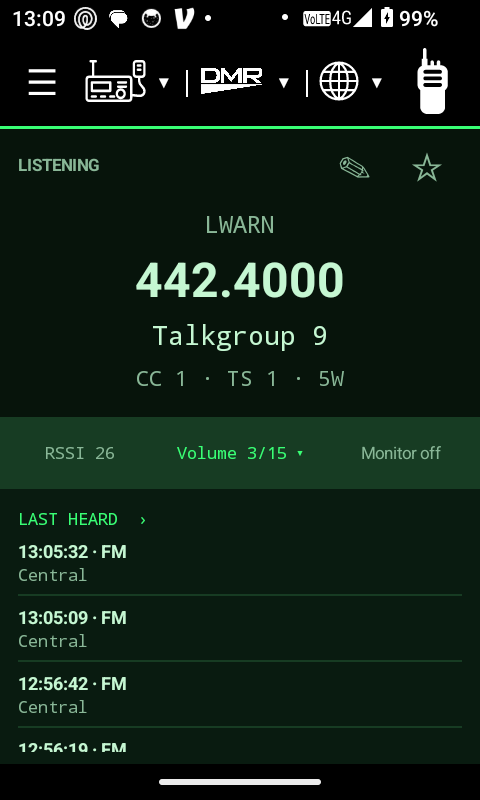
Talkgroup, color code, time slot, and monitor control.
Talkgroups and private calls through your internet link.
A terminal for connected BBS and node sessions.
Receive, save, and select pictures for the air.
Organize zones and import or export your codeplug.
See what the radio and handset are actually doing.
MEASURE TWICE. CUT ONCE.
Enter a frequency for wavelength, half-wave dipole length, individual leg length, and quarter-wave vertical dimensions in meters and feet. Starting dimensions stay right in your field kit.
READ THE CONDITIONS.
Solar indices, HF day/night band guidance, VHF conditions, NOAA D-region absorption maps, and GPS-based local weather. Updates while the page is open and labels cached information with timestamps.
05 / THE DETAILS THAT MAKE IT YOURS
Import and export Field Radio JSON memories. Organize up to 512 zones with 32 channels per zone. A companion single-page JSON editor supports sorting zones alphabetically and talkgroups by ID.
Scrolling call history, timestamps, contact names, and callsigns make it easier to follow a busy channel. DMR and supported internet modes can show cached RadioID details, location, and country flags.
Direct number menus for volume and squelch. Knob channel selection on hardware RF, knob master volume on RoIP, an optional keep-screen-on setting, and 75% foreground brightness.
Diagnostics expose radio model, Android version and build, available RAM and storage, firmware, signal, audio activity, and the last delivered button event. Receive and transmit status change the top bar’s color.
06 / BEFORE YOU KEY UP
Clear expectations for a project that keeps growing.
CJ1 Radio Command is developed around the CJ1 / CJ_1UV Android radio and its onboard RF module. Hardware FM and DMR depend on that integration; this build is not a universal RF-radio app for an ordinary Android phone.
Hardware FM and DMR, local memories, and software audio modes such as analog APRS, packet, SSTV, and MDC1200 use the local radio path. GPS needs a fix for position reports. Internet voice networks, Telnet Winlink, and fresh online contact lookups require connectivity; cached contact information is retained.
The app uses a foreground service and a five-second connection watchdog. Background physical PTT has been operator-tested with the screen off. Android battery restrictions still matter, so the app includes a shortcut to its background battery settings.
It shares the same RF hardware rather than providing a second independent receiver. The app waits for an idle opportunity, switches to the configured APRS frequency, sends the beacon, and returns to voice. Active transmission or other busy conditions defer the beacon.
M17 live voice confirmation is pending. EchoLink awaits account validation and live login/voice testing. SSTV and MDC1200 have local software checks but still need over-the-air validation. Packet and Winlink RF receive/exchange behavior remain in development. A link or local test is not treated as proof of end-to-end RF operation.
These are internet reflector voice clients under the globe menu. The CJ1 hardware RF modes remain analog FM and DMR. P25 trunking, P25 Phase 2, encrypted voice, and hardware D-STAR are not part of this feature set.
This is an actively developed amateur-radio project by Michael D. Hopwood Jr, KE5EUA. The available APK is a development build, not a Play Store release. Features and test status reflect version 1.23.1, documented on October 21, 2026.

BUILT BY A HAM. BUILT TO KEEP EXPLORING.
One place for the everyday contact—and the next experiment. Follow the signal, try a new mode, and make the station your own.
DOWNLOAD ANDROID APK ↗v1.23.1 · Development build · CJ1 hardware required for RF
Package: com.ke5eua.cj1radioham